Key takeaways
- A SEE template gives you headings but not the content under them
- Schedule 1, Part 1 EP&A Regulation 2021 sets content, not format
- Leaving generic prompts in a template is the fastest path to an RFI
- Name the correct LEP and DCP — a template cannot know which apply to you
- Site-specific numbers against every control separate assessment from delay
- Download the free SEE template — a pre-formatted document with all the required sections. Use this guide to fill it in correctly for your council.
A Statement of Environmental Effects template is a reusable document structure that gives you the standard sections of a SEE: a site description, the proposed development, the planning controls, an impact assessment, and a conclusion. A good NSW SEE template follows the content required by Schedule 1, Part 1 of the EP&A Regulation 2021, so you know nothing is missed. You can download a free one further down this page.
A template solves half the problem. It tells you what headings to use and what each section is meant to cover, which is genuinely useful when you are staring at a blank page. What it cannot do is write the content for you. The words under each heading have to describe your site, your project, and your council's specific controls, and that is where a self-prepared SEE either passes or gets sent back. Hand the same blank template to ten people and you get ten different documents, some ready to lodge and some that trigger a request for more information.
This guide shows what a SEE template includes, the standard format councils expect, how to fill it without getting queried, and where a template stops being enough.
Get a council-ready Statement of Environmental Effects for your DA in 5 minutes — no town planner, no waiting.
Get your SEE report →- What a SEE template includes and which sections are non-negotiable
- The standard NSW SEE format councils expect, and why it works
- Three habits that separate a filled template from a queried one
- Where a template stops being enough and what you still have to provide
- How to download the free NSW SEE template and what to do with it
What a SEE Template Includes
A SEE template is the skeleton of a Statement of Environmental Effects — it gives you the headings every assessing officer reads, in the order they read them, with prompts reminding you what each section must address.
A SEE template includes the headings for every section your council needs to assess your Development Application. It is the skeleton of the Statement of Environmental Effects, arranged in the order an assessing officer reads it. A complete template gives you a logical run from the site to the conclusion, with prompts under each heading reminding you what to address.
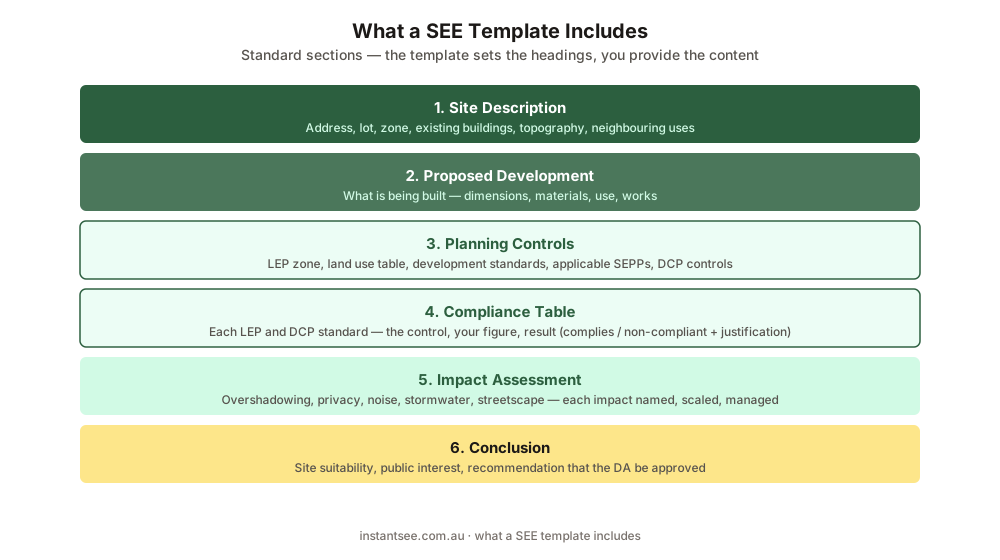
Figure 1: A complete SEE template includes these sections. The depth of each one scales with the size of your project.
At a minimum, a usable SEE template includes: a cover page with the property address, lot and DP number, and applicant details; a site description and existing conditions; a description of the proposed development; a section on the planning controls under your council's LEP and DCP; an impact assessment covering overshadowing, privacy, noise, stormwater, and the other effects relevant to your site; and a conclusion on site suitability. Each heading in the template maps to a matter your council must weigh under s 4.15(1) of the EP&A Act 1979, so following the structure keeps you aligned with the assessment from the start.
The Standard SEE Format for a NSW DA
There is no legally mandated SEE format — Schedule 1, Part 1 of the EP&A Regulation 2021 sets content, not structure — but councils have settled on a common order because it is the fastest for an assessing officer to read.
There is no legally mandated SEE format. Schedule 1, Part 1 of the EP&A Regulation 2021 sets the content a SEE must indicate, but it does not prescribe a template, a font, or a page count. That said, councils across NSW have settled on a common format, because it is the fastest for an assessing officer to read, and a template that follows it gives your DA a familiar shape.
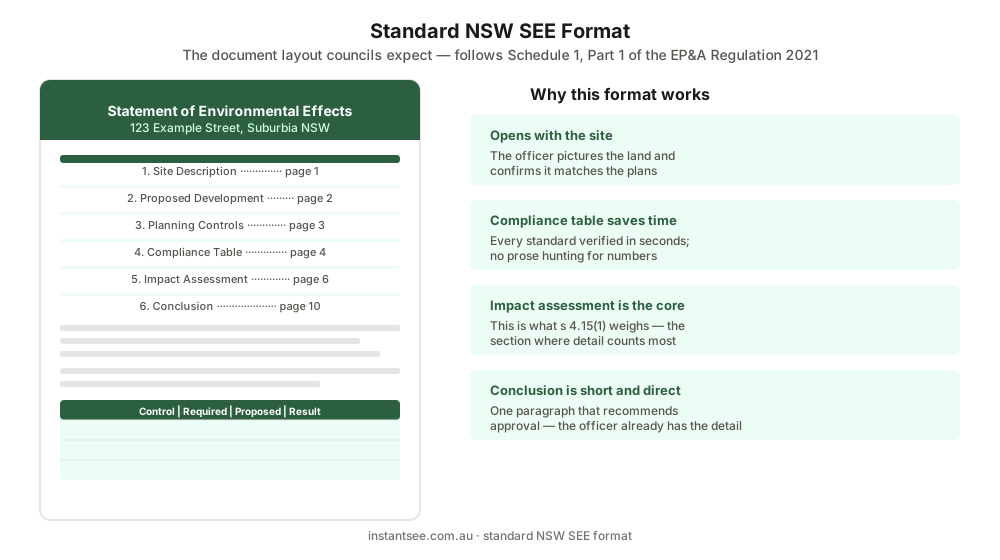
Figure 2: The standard SEE format. Headings run in this order so the document reads as a single argument for the proposal.
The standard format opens with the property and applicant details, then moves through the site, the proposal, the controls, the impacts, and the conclusion in that order. Headings are plain and numbered, tables are used to set a development standard beside your proposed figure (for example, "Maximum height 9.5 m (confirm for your council's LEP) / Proposed 6.8 m / Complies"), and the document ends with a short paragraph recommending approval. A two-page SEE for a rear deck and a fifteen-page SEE for a two-storey addition can use the exact same format. Only the amount written under each heading changes.
How to Use a SEE Template Without Getting Sent Back
Spend 5 minutes, not 3 weeks
instantSEE generates a complete, DA-ready Statement of Environmental Effects online. No town planner. No waiting.
Get your SEE report in 5 minutes →A template only helps if you fill every prompt with content specific to your site — three habits separate a filled template that moves to assessment from a queried one that comes back for more information.
A template only helps if you fill every prompt with content specific to your site. The most common reason a templated SEE gets queried is that the applicant leaves the generic prompts in, or writes a sentence where the section needs a paragraph. Work through the template heading by heading and replace every placeholder with a real answer for your property.
Three habits make the difference. First, put numbers against every control: name your zone, state the height limit and your proposed height, the FSR, the setbacks, and whether you comply with each. Second, be honest in the impact section: if a second storey overshadows a neighbour, say so and explain how you manage it, rather than deleting the overshadowing heading. Third, name the correct LEP and DCP for your council, because a template cannot know which ones apply to you. A blank template plus careful, site-specific answers is a SEE that gets assessed; a blank template with the prompts still showing is a request for information waiting to happen.
- Replace every generic prompt with a real answer for your property
- Put specific numbers against every LEP and DCP control
- Name your council's actual LEP and DCP (not a generic reference)
- If a second storey overshadows a neighbour, assess it honestly — do not delete the heading
- State the lot and DP number, not just the street address
Where a SEE Template Falls Short
A template is a skeleton, not the content — it can remind you to assess overshadowing, but it cannot calculate the shadow your addition casts, and the thinking, measuring, and judgement still fall to you.
A template is a skeleton, not the content, and that is its limit. It can remind you to assess overshadowing, but it cannot calculate the shadow your addition casts. It can prompt you to address the DCP, but it cannot tell you your council's actual setback rule. The thinking, the measuring, and the judgement still fall to you.
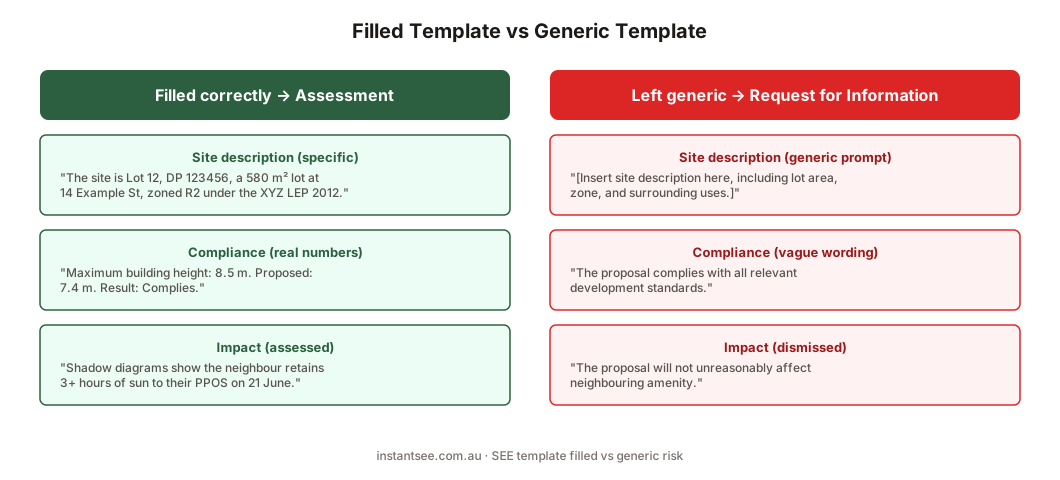
Figure 3: The same template, two outcomes. Site-specific answers move to assessment; generic prompts trigger a request for information.
This is why a free template, while a good starting point, leaves the hard part to you. You still have to read your 10.7 certificate for constraints, find and apply the right LEP and DCP standards, and assess each impact honestly. For a simple project that is manageable in an afternoon. For anything with real overshadowing or privacy questions, it is the difference between a smooth approval and weeks of back-and-forth. The template gives you the structure. You still provide the planning judgement.
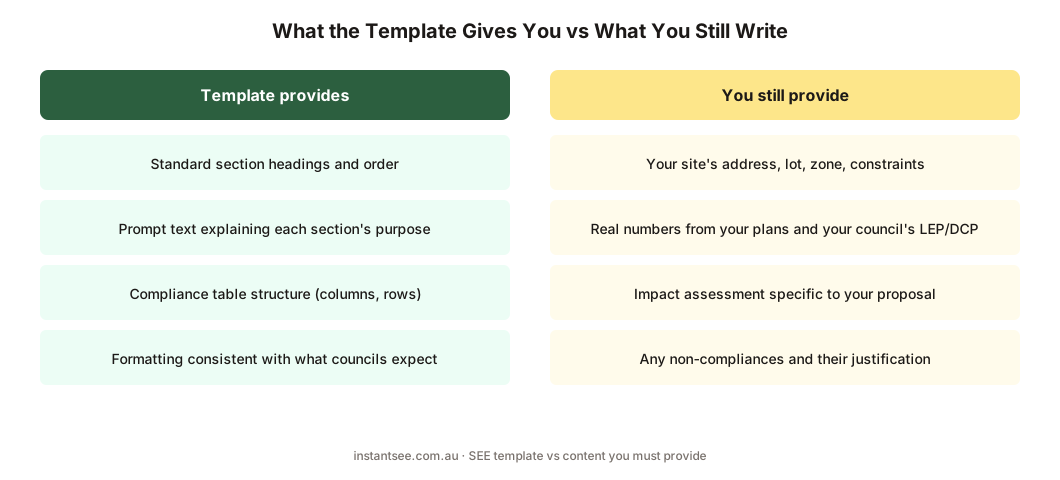
Figure 4: A template hands you the structure on the left. The content on the right is still yours to write.
Download the Free NSW SEE Template
The free NSW SEE template gives you the standard section structure with a prompt under each heading — use it as your starting point and fill every section with details specific to your site.
You can download a free Statement of Environmental Effects template for NSW from our SEE Template page. It gives you the standard section structure above, with a prompt under each heading explaining what to cover, so you can write a SEE that follows the format councils expect.
Use it as your starting point. Fill each section with details specific to your site, put numbers against every LEP and DCP control, and assess the impacts that actually apply to your project. If you would rather not write the content from scratch, the alternative is to have each section prepared for you from a short set of questions, which is what instantSEE does. Either way, start from the right structure and you avoid the most common reason a SEE gets sent back: a missing section.
Frequently asked questions
Is there a free Statement of Environmental Effects template for NSW?
What format should a SEE be in?
Can I just fill in a template and lodge it?
What does a SEE template not do?
How long is a SEE based on a template?
Ready to get your SEE report?
Skip the writing. Get a DA-ready Statement of Environmental Effects in 5 minutes.
Get your SEE report