Your Statement of Environmental Effects. $800-$2,500. $149.
In five minutes.
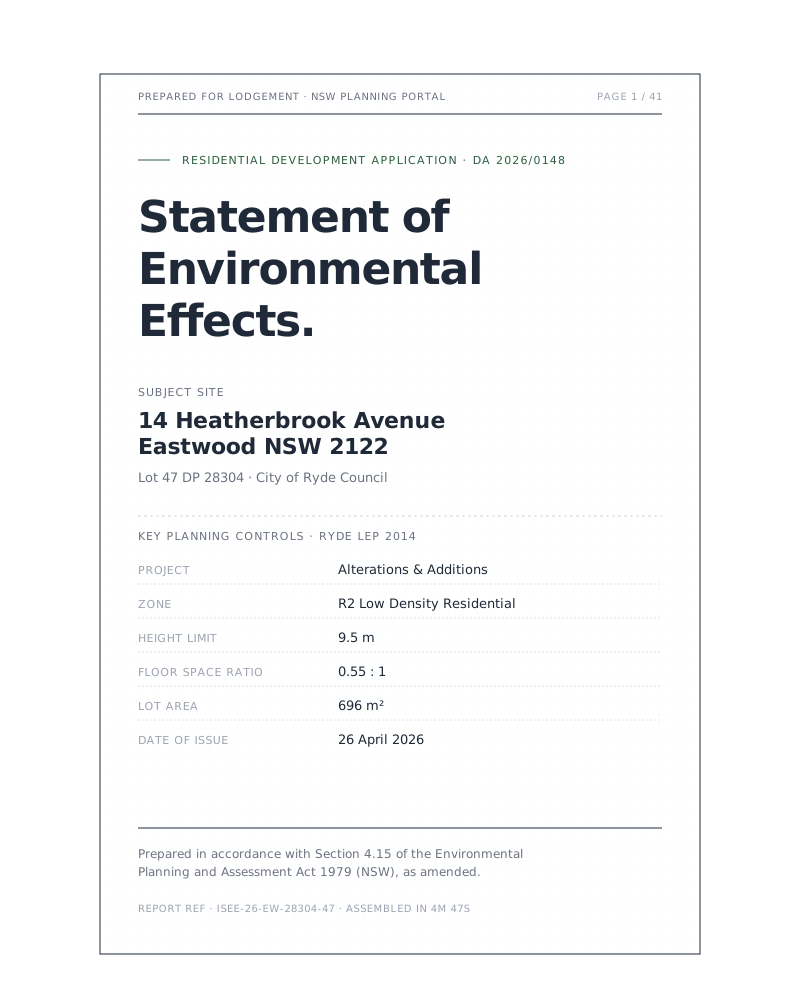
Every residential DA in NSW needs one. Your planner takes 1–3 weeks and costs $800-$2,500. We pull the same NSW government data and deliver your council-ready PDF in five minutes.
From address to council-ready PDF. In three steps.
Account created instantly. Report delivered same day.
Enter your address
Describe your build
Download your report
Everything a council needs. Nothing you don't.
One payment. Full report. Every section, every compliance table, every map. Re-run free if you need changes.
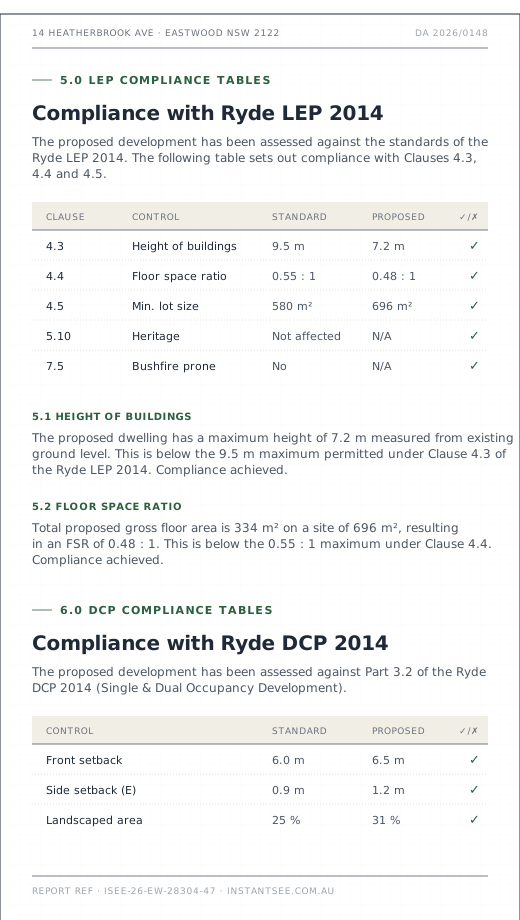
Every control checked. Every table filled.
We verify your proposal against the four controls councils return RFIs on most often — before you lodge.
Setbacks
Height limit
Floor-to-site ratio
Private open space
One product. One price.
No subscription. No monthly commitment. Pay per report.
- →Council-ready PDF
- →Editable Word document
- →Section 4.15 + LEP + DCP tables
- →Ready in 5 minutes
- →Free re-runs for same address
- →Refund guarantee — no questions asked
What councils, designers and homeowners ask.
01Will council accept this report?
Yes. Every report addresses all matters a consent authority must consider under Section 4.15 of the Environmental Planning and Assessment Act 1979, as amended by the Planning Systems Reform Act 2025. The report is structured to the same standard as a report prepared by a qualified town planner — Introduction, Site Analysis, LEP Compliance, DCP Compliance, SEPP Assessment, Section 4.15 Evaluation, and Conclusion.
Compliance tables are formatted for direct council review. We recommend reviewing every section before lodging. If you identify any site-specific detail that needs adjustment, the editable Word version allows you to make changes.
02How is the report generated?
We pull live planning data from NSW Spatial Services, the NSW Planning Portal, ArcGIS MapServers, and the Rural Fire Service. This is the same data a town planner accesses manually — zoning, LEP controls, DCP standards, bushfire mapping, heritage registers, flood overlays. The data is compiled into a structured compliance assessment covering every matter under Section 4.15.
The entire process — data collection, compliance verification, report assembly — takes approximately five minutes.
03What if council requests more information?
Requests for Information (RFIs) are a normal part of the DA process and occur with planner-prepared SEEs too. Common RFIs relate to site-specific details that require on-ground verification — stormwater management plans, shadow diagrams, or neighbour notification responses.
Your report includes an editable Word document. If council requests additional detail on a specific section, you can add it directly and re-upload to the NSW Planning Portal. You can also re-run the report for the same address at no extra charge.
04Which councils are supported?
We support all NSW councils for planning data collection — zoning, height, FSR, heritage, bushfire, and flood data is pulled state-wide from NSW government APIs. DCP-specific compliance tables are currently available for 30+ Sydney metropolitan councils, with regional councils being added progressively.
If your council's DCP isn't yet in our system, the report will include all LEP and SEPP compliance but flag DCP sections for manual review.
05What about heritage, flood or bushfire overlays?
We automatically detect all three from government APIs.
Heritage — checked against the NSW Heritage Register and your council's LEP heritage schedule. If your site is a heritage item or within a Heritage Conservation Area, the report includes a heritage impact assessment section.
Flood — checked against the LEP flood planning area map. Flood-affected sites receive additional assessment against the NSW Floodplain Development Manual.
Bushfire — checked against the Rural Fire Service bush fire prone land map. Category 1, Category 2, and vegetation buffer zones are identified and assessed against Planning for Bush Fire Protection 2019.
06Do I need to create an account?
Yes — account creation takes 30 seconds and happens automatically when you pay. Your account stores every report you've generated so you can re-download or re-run them at any time. Re-running a report for the same address is free.
07What is a Statement of Environmental Effects?
A Statement of Environmental Effects (SEE) is a mandatory document for all Development Applications in NSW. It's required under Schedule 1 of the Environmental Planning and Assessment Regulation 2021.
The SEE assesses the environmental impacts of your proposed development and demonstrates compliance with planning controls — the Local Environmental Plan (LEP), Development Control Plan (DCP), and relevant State Environmental Planning Policies (SEPPs).
Without a SEE, your DA cannot be lodged on the NSW Planning Portal. Council cannot assess an incomplete application.
08What does $149 actually buy me?
$149 delivers two files: a council-ready PDF formatted with page numbers and your address on every page, ready for the NSW Planning Portal, and an editable Word document for any site-specific adjustments. Both are stored against your account for unlimited re-download. Need to re-run the report for the same address — after an RFI, or if your plans change? That's free, always.
09How do I lodge the report with council?
Download the PDF from your report page. Log into the NSW Planning Portal, start your Development Application, and upload the PDF where it asks for a Statement of Environmental Effects. The editable Word version lets you make any last adjustments before lodging.
Your report. Five minutes.
Enter your NSW address — your council-ready PDF and editable Word document will be ready in five minutes.
Everything you need to lodge your DA
What Is a Statement of Environmental Effects?
The complete guide to the SEE — what it is, who needs one, and how to prepare yours.
13 min readDA ProcessHow to Lodge a Development Application in NSW
Step-by-step guide to lodging a DA through the NSW Planning Portal.
9 min readCosts & FeesHow Much Does a Town Planner Cost in NSW?
2026 pricing for SEE preparation — planners vs instantSEE vs DIY.
7 min read