Key takeaways
- Online DA lodgement via the portal has been mandatory since 1 July 2021
- All 128 NSW councils receive DAs through the Planning Portal
- Your DA is not lodged until completeness check passes and fee is paid
- The Spatial Viewer lets you check zoning before you start your DA
- Missing one document sends your application back before assessment begins
The NSW Planning Portal at planningportal.nsw.gov.au is the NSW Government's online system for lodging development applications. Since 1 July 2021 you must lodge your DA through the portal; councils no longer accept paper applications over the counter. You register an account, complete an online DA form, upload your documents, pay the fee, and your council picks the application up for assessment.
The portal is straightforward once you know the workflow, but the first time through it can be confusing. People get stuck creating the right account, entering Lot and DP details, or working out which document goes where, and a single missing file can send the whole application back before assessment even starts.
Get a council-ready Statement of Environmental Effects for your DA in 5 minutes — no town planner, no waiting.
Get your SEE report →- What the NSW Planning Portal is and why it is the only lodgement channel
- What documents and information you need before you log in
- The exact six steps to lodge a DA on the portal
- What happens after you submit, including the council completeness check
- How to track your DA and respond to council requests through the portal
What Is the NSW Planning Portal?
The NSW Planning Portal is the statewide online system all 128 NSW councils use to receive development applications — since 1 July 2021 it is the only lawful lodgement channel, replacing over-the-counter submission everywhere in NSW.
The NSW Planning Portal is the statewide online platform that all 128 NSW councils use to receive development applications and related certificates. It replaced over-the-counter lodgement: from 1 July 2021, applicants must register for a NSW Planning Portal account to complete an online development application, and councils process those applications entirely within the portal.
The portal does more than accept your DA. It includes a Spatial Viewer where you can look up a property's zoning and the planning controls that apply, which is the first thing to check when you want to confirm your project needs a DA at all rather than a faster pathway. Once you lodge, the portal becomes the single channel for the application: the council sends notifications, requests for information, and the determination through it, and you respond through it. If you want the broader picture of the lodgement process beyond the portal mechanics, the guide to how to lodge a DA in NSW sets out the full sequence.
What You Need Before You Start
Assembling every required document before you log in is the single most effective way to get through the portal without delay — lodging with a gap is the most common reason an application stalls at the completeness check.
The portal will not let you finish an online DA without the mandatory items, so it pays to assemble everything before you log in. Lodging with a gap is the most common reason an application is held up at the council's completeness check.
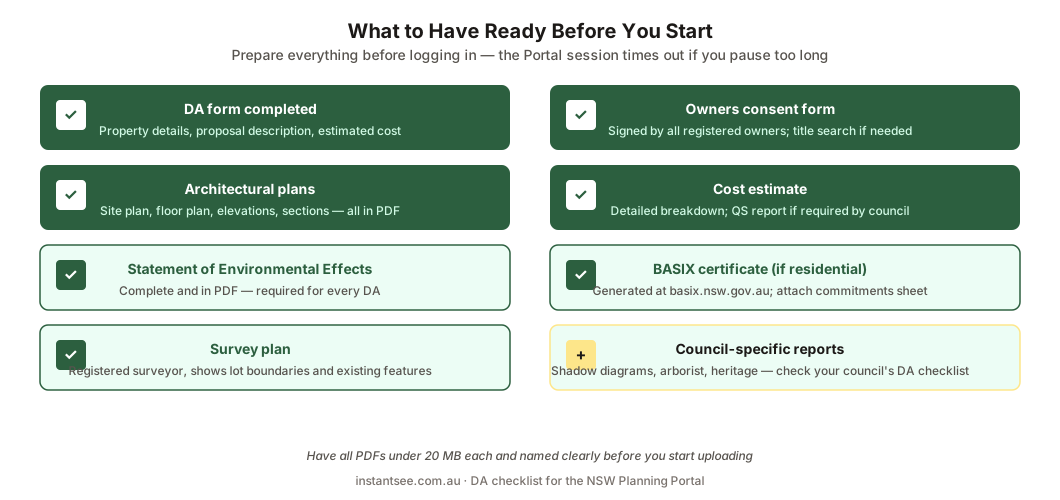
Figure 2: What to have ready before you start. A missing item is what holds your DA up.
You need a NSW Planning Portal account, your property's Lot and DP numbers, a clear description of the development and its estimated cost, and your supporting documents. The NSW Planning Portal's own Online DA guidance lists the minimum as a description of the development, the estimated cost, a plan of the land, drawings, and an environmental assessment, which for a standard residential project is your Statement of Environmental Effects. You will also need the owner's consent and a cost estimate report. Of all of these, the SEE is the one you have to write yourself rather than order from a designer or assessor, which is why it is the document people most often lodge without.
- Registered NSW Planning Portal account (create free at planningportal.nsw.gov.au)
- Property Lot and DP numbers (from rates notice or section 10.7 certificate)
- Development description and estimated cost
- Architectural plans and site plan
- Statement of Environmental Effects
- BASIX certificate (residential work)
- Owner's consent signed by all owners
- Cost estimate report
How to Lodge a DA on the NSW Planning Portal
Spend 5 minutes, not 3 weeks
instantSEE generates a complete, DA-ready Statement of Environmental Effects online. No town planner. No waiting.
Get your SEE report in 5 minutes →The six-step lodgement workflow is identical across all 128 councils — the only variation is each council's local document checklist, not the portal mechanics themselves.
The workflow is the same for every council, even though each adds its own document checklist. There are six steps from logging in to submitting.
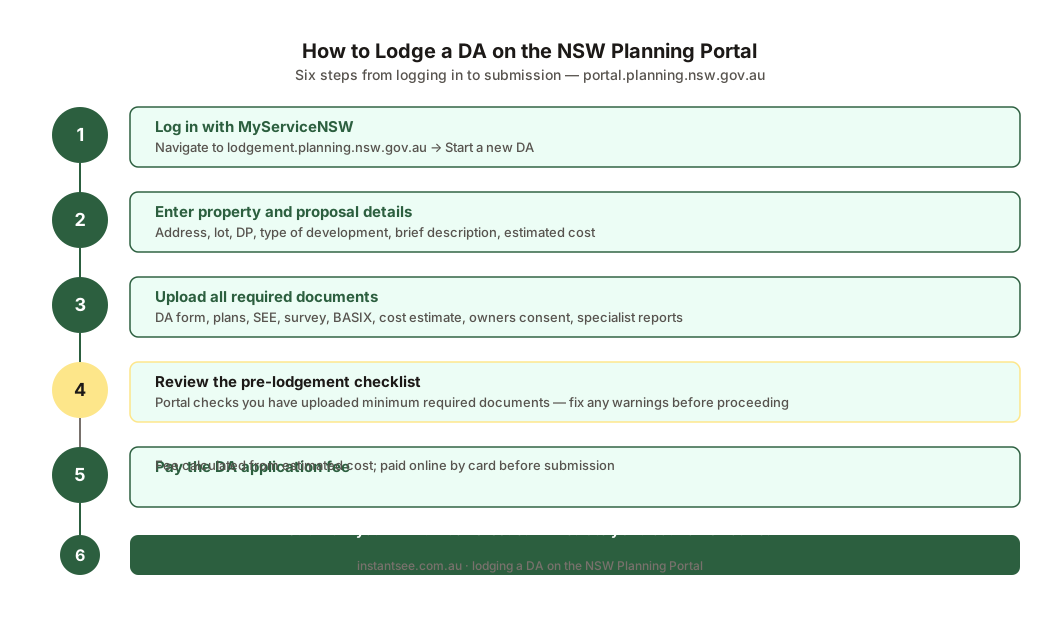
Figure 1: The six steps to lodge a DA on the portal, from creating your account to submitting for the council to pick up.
First, create or log in to your NSW Planning Portal account; you can register directly or link a MyServiceNSW login. Second, from your dashboard select New and choose Development Application. Third, enter the site and proposal details, including the address, the Lot and DP numbers, the development description and the estimated cost. Entering the wrong Lot and DP is a known cause of delay, so check them against your rates notice or section 10.7 certificate. Fourth, invite the owner and any other party such as a certifier or consultant so they can act on the application. Fifth, upload all required documents, including the SEE, plans, site plan, BASIX certificate, owner's consent and cost estimate report. A free DA Lodgement Checklist for NSW and the matching DA lodgement checklist guide help you confirm the set is complete. Sixth, review every field and file, then submit so the council can pick it up.
What Happens After You Submit
Submitting is not the same as being lodged — your DA is not legally lodged, and the assessment clock does not start, until the council's completeness check passes and the fee is paid.
Submitting is not the same as being lodged. Once your application lands, the council runs a completeness check before it is formally accepted.
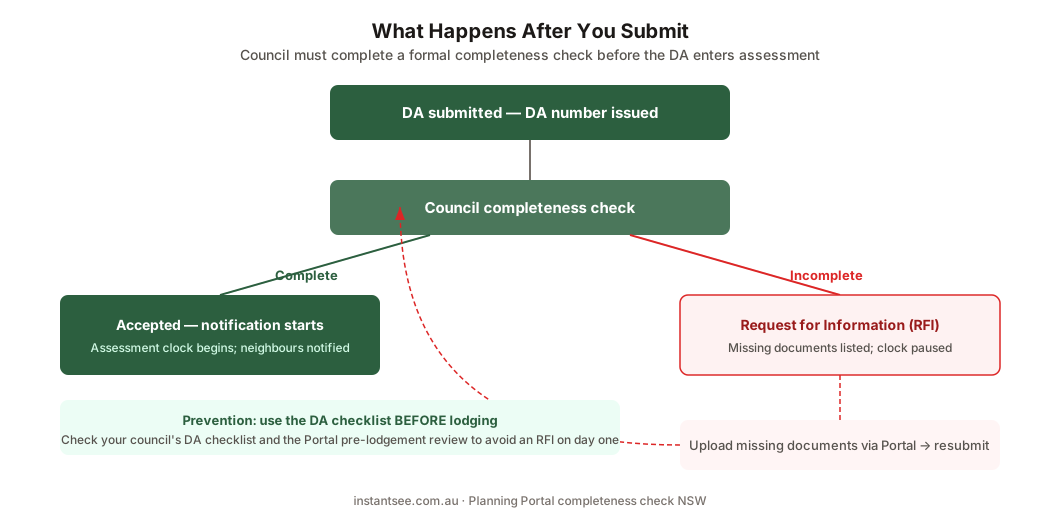
Figure 3: The completeness check. A complete DA is accepted and assessed; a missing document is sent back through the portal.
If your application is complete, the council accepts it, issues the DA fee, and assessment begins once you pay. If a document is missing or unclear, the council requests more information through the portal, and you upload the missing item through your account rather than by email or hard copy, which councils do not accept. Your DA is not legally lodged until the set is complete and the fee is paid, and the assessment clock only starts from that point. This is why a clean first submission matters: every round of back-and-forth at the completeness check adds days or weeks before your DA even enters the assessment queue. The guide to how long DA approval takes in NSW explains where that clock goes from there.
Tracking Your DA and Responding to Council
After lodgement the portal is the single channel for every part of your application — council messages, document uploads, fee payments, and status updates all run through your dashboard.
After lodgement, the portal is where the whole application lives. Your dashboard shows the status of every application tied to your account, and any action the council needs from you appears there.
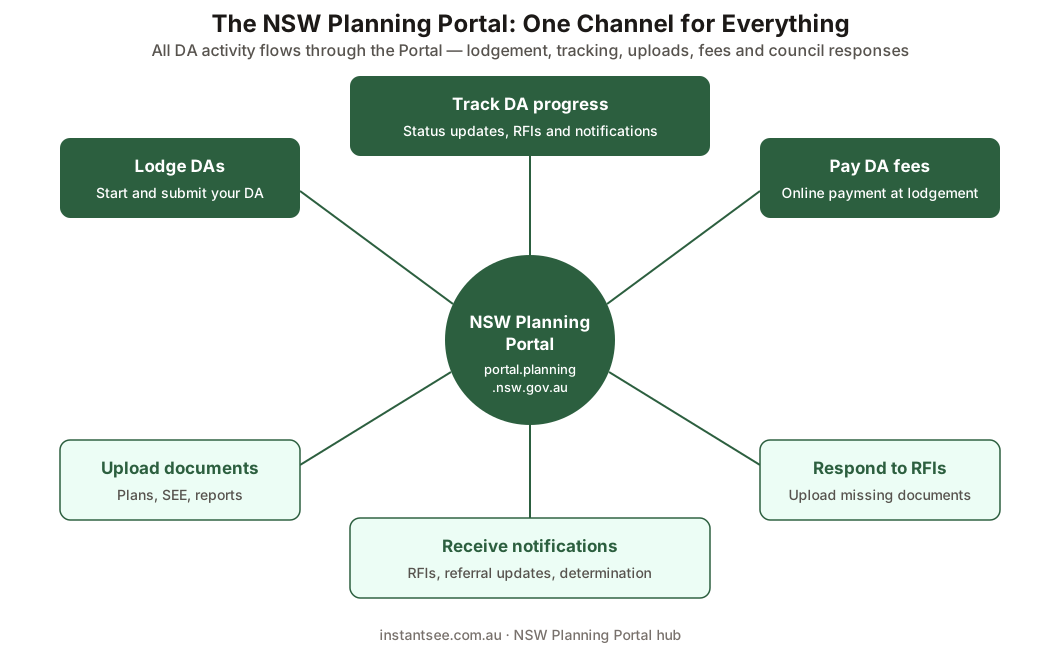
Figure 4: The portal is the single channel for your DA, from lodging and tracking to council requests and payment.
When the council messages you, you receive a notification and respond in the portal. When it requests additional information, you upload it to the same application record. When fees are due, you pay them through the portal's Service NSW payment gateway. Because email and hard copy are not accepted, checking your portal account is the only way to know where your DA stands, so it is worth logging in regularly while your application is under assessment. Keeping every document and message in one place also means that if a question arises later, the full history of your DA is in the one record.
Frequently asked questions
What is the NSW Planning Portal?
Do I have to lodge my DA through the portal?
What account do I need for the NSW Planning Portal?
How do I lodge a DA on the NSW Planning Portal?
What happens if my DA is missing a document?
Ready to get your SEE report?
Skip the writing. Get a DA-ready Statement of Environmental Effects in 5 minutes.
Get your SEE report