Key takeaways
- instantSEE builds your SEE from live NSW government planning data, not guesswork
- Automated reports handle standard residential DAs well; genuinely complex or non-compliant proposals still need a planner's judgment
- Every instantSEE report is a professional draft you review before lodging — not a black box
- The most common cause of an RFI is a missing or site-specific detail, which the editable report lets you add
- Section 4.15 of the EP&A Act 1979 sets the matters every SEE must address, whoever writes it
An AI-generated Statement of Environmental Effects is reliable for a standard residential Development Application when it is built from live planning data and you review it before lodging. The reason is simple: a SEE is a structured assessment against published controls, and most of the work is pulling the right controls for your site and applying them consistently. That is exactly what software does well. Where automated reports need care is the same place a junior planner does — genuinely complex sites, non-compliant proposals, and judgment calls that depend on facts only a person on the ground can confirm.
This guide is deliberately transparent. Rather than tell you an automated SEE is perfect, it explains exactly how instantSEE builds your report, where automation genuinely has limits, how those limits are handled, and when you should still pay a town planner. Whoever prepares your SEE, it has to address the same matters under section 4.15 of the Environmental Planning and Assessment Act 1979 — so the real question is not "human or AI" but "is every required matter covered correctly for this site."
Get a council-ready Statement of Environmental Effects for your DA in 5 minutes — no town planner, no waiting.
Get your SEE report →- How instantSEE builds your SEE from live NSW government data
- Where automated SEE reports genuinely have limits — stated plainly
- How instantSEE handles each of those limits
- When you should still use a town planner
- How to check your report before you lodge it
How instantSEE Builds Your SEE
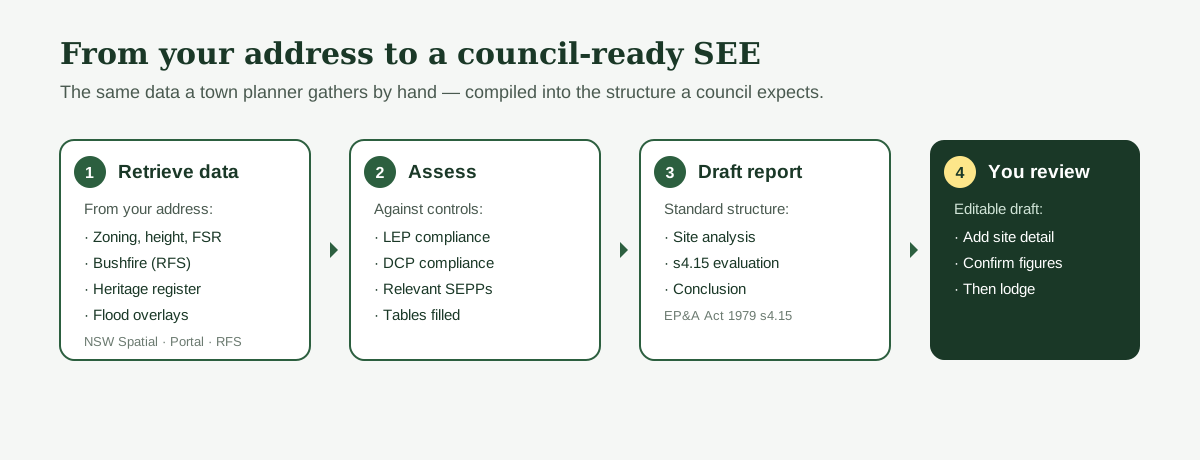
instantSEE pulls the same government planning data a town planner accesses manually — zoning, LEP and DCP controls, bushfire, heritage and flood overlays — and compiles it into a structured assessment against every matter under section 4.15.
instantSEE does not write your report from a generic template and hope. It starts from your address and retrieves the live planning data that governs your site: zoning, height, floor space ratio and lot size from NSW Spatial Services and the NSW Planning Portal; bushfire-prone land from the Rural Fire Service; heritage from the NSW Heritage Register and your council's LEP schedule; and flood and other overlays from the relevant ArcGIS map services. This is the same source data a planner gathers by hand.
That data is then compiled into the standard SEE structure a council expects — site analysis, LEP compliance, DCP compliance, relevant SEPP assessment, a section 4.15 evaluation, and a conclusion — with the compliance tables filled against the controls that actually apply to your lot. The requirement to lodge a SEE comes from Schedule 1 of the Environmental Planning and Assessment Regulation 2021, and the matters it must address come from section 4.15 of the EP&A Act 1979.
Where Automated SEE Reports Have Limits
Automated reports are strong on the data-driven parts of a SEE and weaker on judgment that depends on facts only a person can verify on site — so it is worth knowing exactly where the line sits.
The honest answer is that some parts of a SEE are not a data lookup. These are the areas where any automated report — and instantSEE is no exception — needs you in the loop:
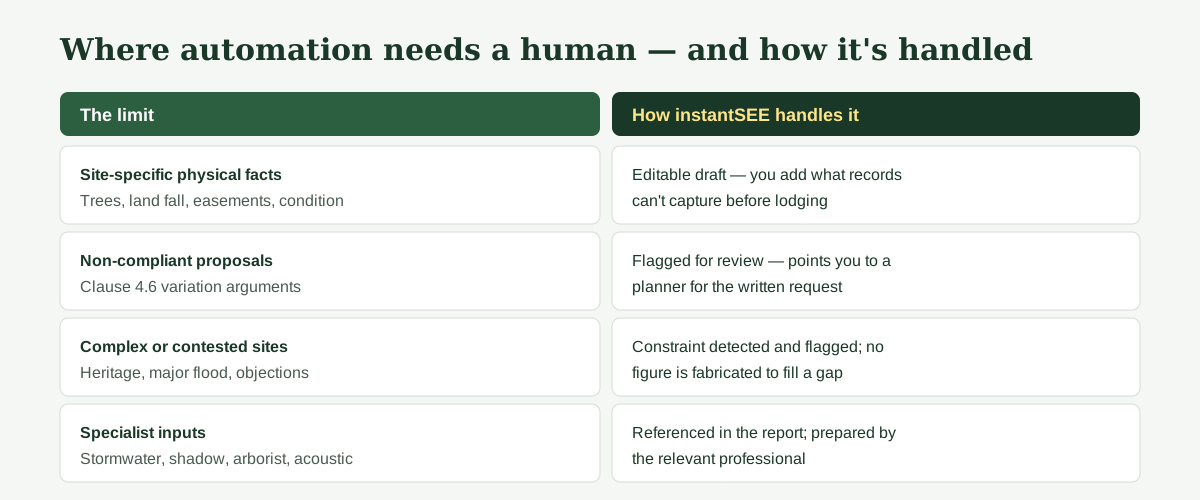
- Site-specific physical facts. Whether a tree is actually where the survey says, the real fall of the land, an undocumented easement, or the true condition of an existing structure. Software works from records; records can be out of date.
- Genuinely non-compliant proposals. If your design breaches a development standard and you need a Clause 4.6 variation request, that is a written argument about why compliance is unreasonable in your case — a judgment task, not a table.
- Complex or contested sites. Heritage conservation areas, significant flooding, contaminated land, or a proposal that has already drawn neighbour objections can turn on planning judgment and negotiation.
- Specialist inputs. Stormwater plans, shadow diagrams, arborist and acoustic reports are separate documents prepared by other professionals; a SEE references them but cannot manufacture them.
How instantSEE Handles Those Limits
Spend 5 minutes, not 3 weeks
instantSEE generates a complete, DA-ready Statement of Environmental Effects online. No town planner. No waiting.
Get your SEE report in 5 minutes →instantSEE is built to be a professional draft you control, not a black box — every report is editable, every section is reviewable, and complex matters are flagged rather than guessed.
Three things keep an instantSEE report reliable in practice. First, it is a draft you review and edit, delivered as an editable document — so any site-specific detail you know and the data does not can be added before you lodge. Second, it does not invent figures: where a control or a fact needs site verification, the report directs you to confirm it against the source rather than fabricating a number. Third, where a proposal looks non-compliant or a site carries a serious constraint, the report flags the matter for review and points you toward the right step, including engaging a planner for a Clause 4.6 request or a specialist report.
In other words, the reliability does not come from claiming the software is infallible. It comes from the report being transparent, editable, and honest about its own limits — the opposite of a black box.
When You Should Still Use a Town Planner
For a straightforward, compliant residential DA you can prepare and lodge a SEE yourself with instantSEE; the cases below are where a planner's judgment genuinely earns the fee.
It would not be honest to say nobody needs a planner. Use one when your proposal is genuinely non-compliant and needs a Clause 4.6 variation argued, when your site is heritage-listed or significantly flood- or bushfire-affected, when the development is large or commercial, or when a DA has already been refused or has drawn objections you need to negotiate. A town planner typically charges $800 to $2,500 for a SEE and takes one to three weeks. For a standard, compliant residential DA, that is often more process than the job needs — which is the gap instantSEE fills.
How to Check Your Report Before You Lodge
A few minutes of review catches the things that actually cause Requests for Information — most of which are site-specific details, not data errors.
Requests for Information (RFIs) are a normal part of the DA process and happen with planner-prepared reports too. The most common triggers are missing site-specific detail, not a wrong control. Before lodging, read each section and confirm the site description matches your property, check that any figure flagged for verification has been confirmed against the NSW Planning Portal or your section 10.7 certificate, and add any local knowledge the data could not capture. The editable report exists precisely so you can do this.
The Bottom Line
An AI-generated SEE is reliable for the job most homeowners and designers actually have: a standard, compliant residential DA that needs an accurate, well-structured report built from the right planning data. It is reliable because it is built from live government sources, because it does not fabricate figures, and because it is an editable draft you review before lodging — not a black box. Where a proposal is genuinely complex or non-compliant, the honest answer is to involve a town planner, and a good automated report tells you that rather than pretending otherwise.
This guide is general information about the NSW planning system, not legal or planning advice for your specific site. Review every section of any SEE before submitting it to council.
Frequently asked questions
Are AI-generated SEE reports accepted by councils in NSW?
Can I trust an automated SEE for a complex or non-compliant proposal?
How does instantSEE avoid getting the planning controls wrong?
What if my council requests more information after I lodge?
Is an automated SEE just a generic template with my address pasted in?
Ready to get your SEE report?
Skip the writing. Get a DA-ready Statement of Environmental Effects in 5 minutes.
Get your SEE report